Varie Risorse utili
Niccolò Salvini
2021-05-13
0.1 issues templates
Spesso è difficile risolvere un problema quando i dettagli importanti mancano o non sono ben evidenziati. Da febbario 2016 i manutentori/propietari di repo possono aggiungere dei templates prestabiliti ai loro loro progetti per Issues e Pull Requests. Facendo questo aiutano i contributori e collaboratori a condividere i dettagli necessari a cominciare una discussione.
Per aggiungere un template ad una repo è necessario creare un file ISSUE_TEMPLATE nella root dir. L’estesione del file è opzionale ma la buona pratica vuole che sia .md (è possibile avere una preview cliccandoci sopra come accade in automatico col README.md). L’estensione .mdrende facile l’aggiunta di elementi come paragrafi, links, e menzioni a collaboratori, proprio come liste TODOs per i templates.
I templates per Pull Requests seguono lo stesso modello: aggiungi un file nominato PULL_REQUEST_TEMPLATE al root della tua repo.
Altrimenti procedi per Settings > Features > Issues > Set up templates (scelta dell’autore).
Se sei preoccupato del disordine nella root allora il consiglio è creare una dir .github/ dove spostare CONTRIBUTING.md, ISSUE_TEMPLATE.md, and PULL_REQUEST_TEMPLATE.md. GitHub si occupererà si recuperare i files e tutto funzionerà esattamente alla stessa maniera.
Se vuoi approfondire oltre questo ecco la documentazione.
0.2 Creazione Templates
Nel reindirizzamento dopo aver cliccato su Set up templates appare un’opzione centrale “Add Template” con un drop down menu.
0.3 
Le tre default options proposte, per il momento sufficienti, sono:
- Bug Report
- Feature request
- Custom Template
Selezionando Bug Report automaticamente viene aggiunto una piccola tab con due tasti: “Preview and edit” e un cestino. Cliccando sul primo otteniamo:
0.4 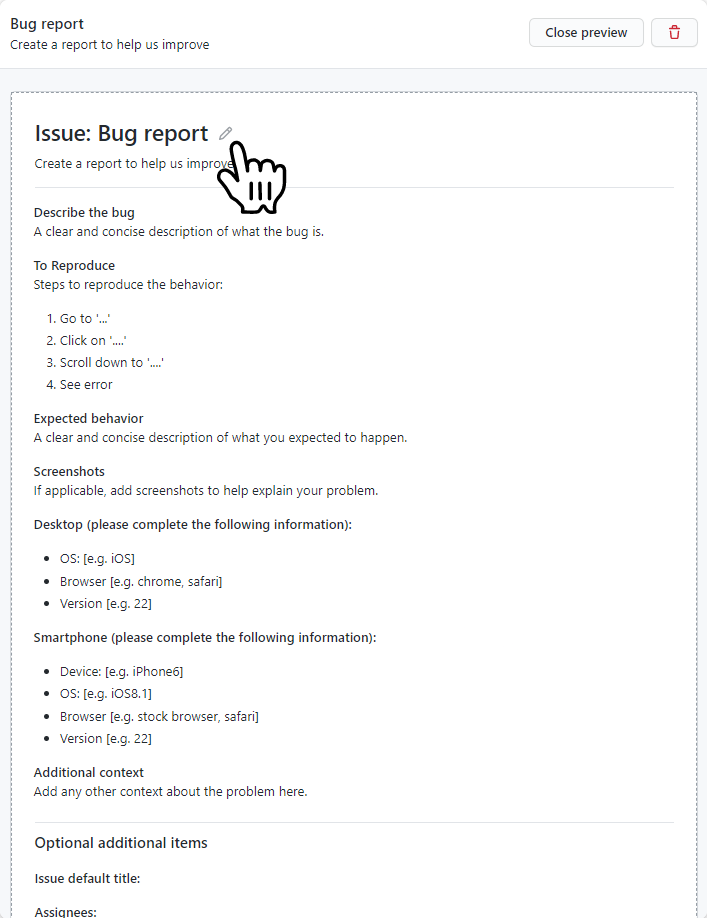
La icona accanto al titolo Bug report segnalata dalla mano permette di modificare il template in tutte le sue parti:
- Template name: permettendoci di flettere il template a poter accogliere qualsiasi tipo di richiesta dell utente
- About: una piccola descrizione di quello che è il template name
- Template content: il più importante, permette di editare il contenuto del template con sintassi Markdown.
Altre caratteristiche addizionali:
- Issue Default Title: solitamente un acronimo o una parola corta che precederà il titolo, di modo che in situazioni con tanti templates e con tante issues sarà possibile ricollegare subito la issue alla fattispecie di problema e stabilire priorità.
- Assignees: permette di assegnare collaboratori a determinate issues, compartimenta il lavoro e lo specializza.
- altre..
Sotto sono stati riadattati due templates dall’autore per le azioni di Bug Report e di Pull Request. Niente vieta che tu possa scrivere le tue e formattarle come meglio credi sulle base delle esigenze che tu hai, per tutto il resto metto le mie. Sono aspecifiche e atematiche. E’ sufficiente copiarle ed incollarle nel Template content.
0.4.1 Bug Report temp:
# Prerequisites

Please answer the following questions for yourself before submitting an issue. **YOU MAY DELETE THE PREREQUISITES SECTION.**

- [ ] I am running the latest version
- [ ] I checked the documentation and found no answer
- [ ] I checked to make sure that this issue has not already been filed
- [ ] I'm reporting the issue to the correct repository (for multi-repository projects)

# Expected Behavior

Please describe the behavior you are expecting

# Current Behavior

What is the current behavior?

# Failure Information (for bugs)

Please help provide information about the failure if this is a bug. If it is not a bug, please remove the rest of this template.

## Steps to Reproduce

Please provide detailed steps for reproducing the issue.

1. step 1
2. step 2
3. you get it...

## Context

Please provide any relevant information about your setup. This is important in case the issue is not reproducible except for under certain conditions.

* Firmware Version:
* Operating System:
* SDK version:
* Toolchain version:

## Failure Logs

Please include any relevant log snippets or files here.
0.4.2 Pull Request temp:
### All Submissions:

* [ ] Have you followed the guidelines in our Contributing document?
* [ ] Have you checked to ensure there aren't other open [Pull Requests](../../../pulls) for the same update/change?

<!-- You can erase any parts of this template not applicable to your Pull Request. -->

### New Feature Submissions:

1. [ ] Does your submission pass tests?
2. [ ] Have you lint your code locally prior to submission?

### Changes to Core Features:

* [ ] Have you added an explanation of what your changes do and why you'd like us to include them?
* [ ] Have you written new tests for your core changes, as applicable?
* [ ] Have you successfully ran tests with your changes locally?
Fatto questo naviga dinuovo verso la tua cartella e apri l’ issue pane. Adesso è comparso il template del bug report.
A work by Niccolò Salvini
niccolo.salvini27@gmail.com
Made with in Florence